

All your local marketing, scored against your goals.
One marketing dashboard for local businesses: plan and approve social posts, track reviews and local listings, and see your Google Analytics numbers, all inside WordPress.
Version 1.0.1 · Free · WordPress 6.4+ · PHP 7.4+ · GPLv2 or later
Five tools, one small team, and nobody sees the whole picture.
Most local businesses don't have a marketing department. Someone schedules posts in one app, keeps listings in a spreadsheet, checks reviews on three sites and opens Google Analytics when they remember. Nothing is measured against a goal, and mistakes go out unreviewed.
Everything a small team needs to market with confidence.
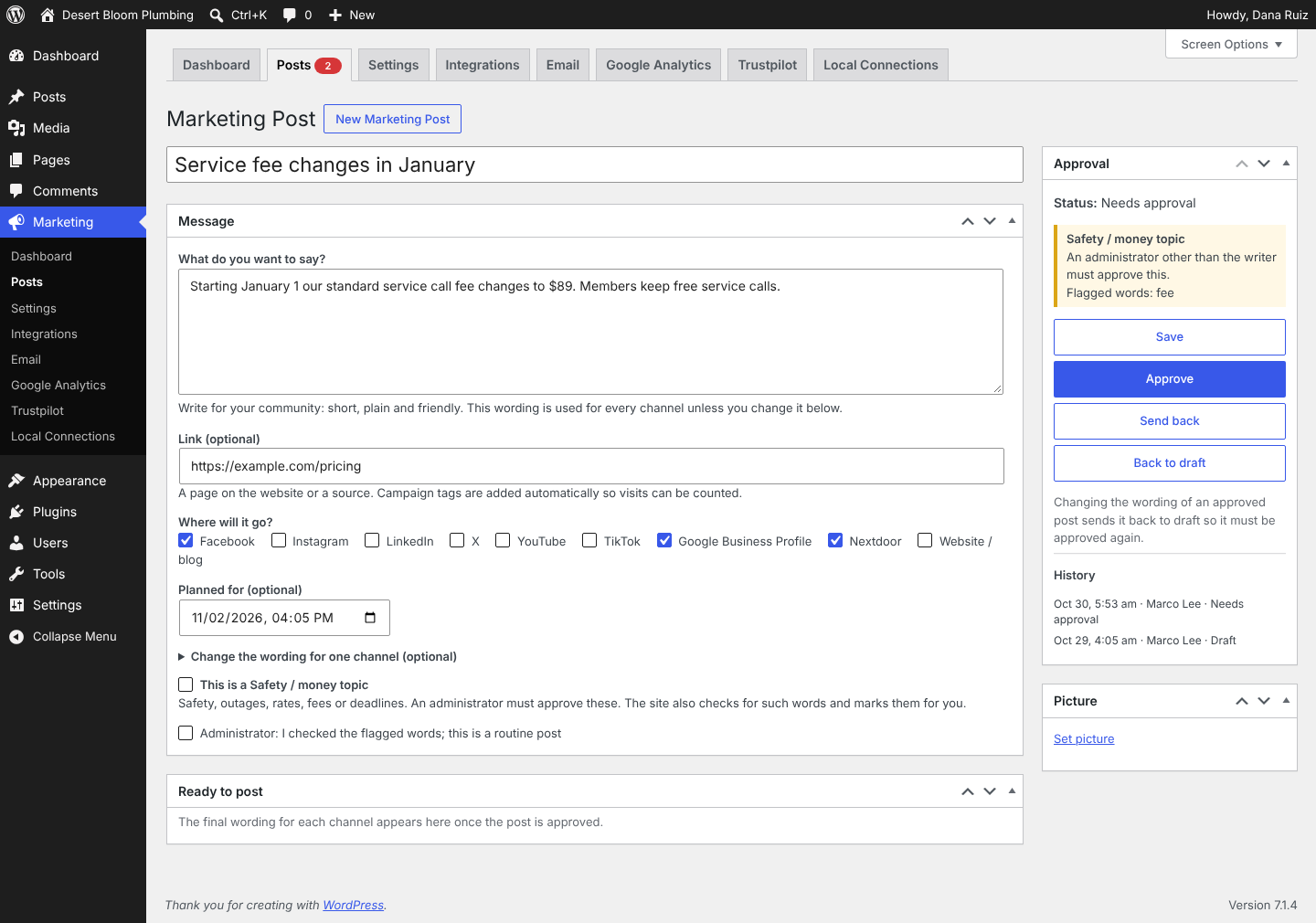
Write once, approve, post everywhere
One message, tailored per channel
Character limits are checked for X, Instagram, LinkedIn, TikTok and Google Business Profile as you write.
Approval lock
Change the wording, link, channels or picture of an approved post and it goes back for approval. What goes out is exactly what was approved.
Safety and money rule
Posts that mention outages, closures, recalls, prices, fees, deadlines or refunds are flagged and need an administrator other than the writer to approve them. You can edit the trigger words.
Automatic campaign tags
Every link gets UTM tags, so visits from your posts show up in Google Analytics.
Full history on every post
Who wrote it, who approved it and when it went out.
Send through Publer
Connect your own Publer account to send approved posts to Facebook, LinkedIn, X and Google Business Profile on schedule. Nextdoor, Yelp and your website are copy-and-paste channels. Publer's API needs its Business plan.
See every number against a goal
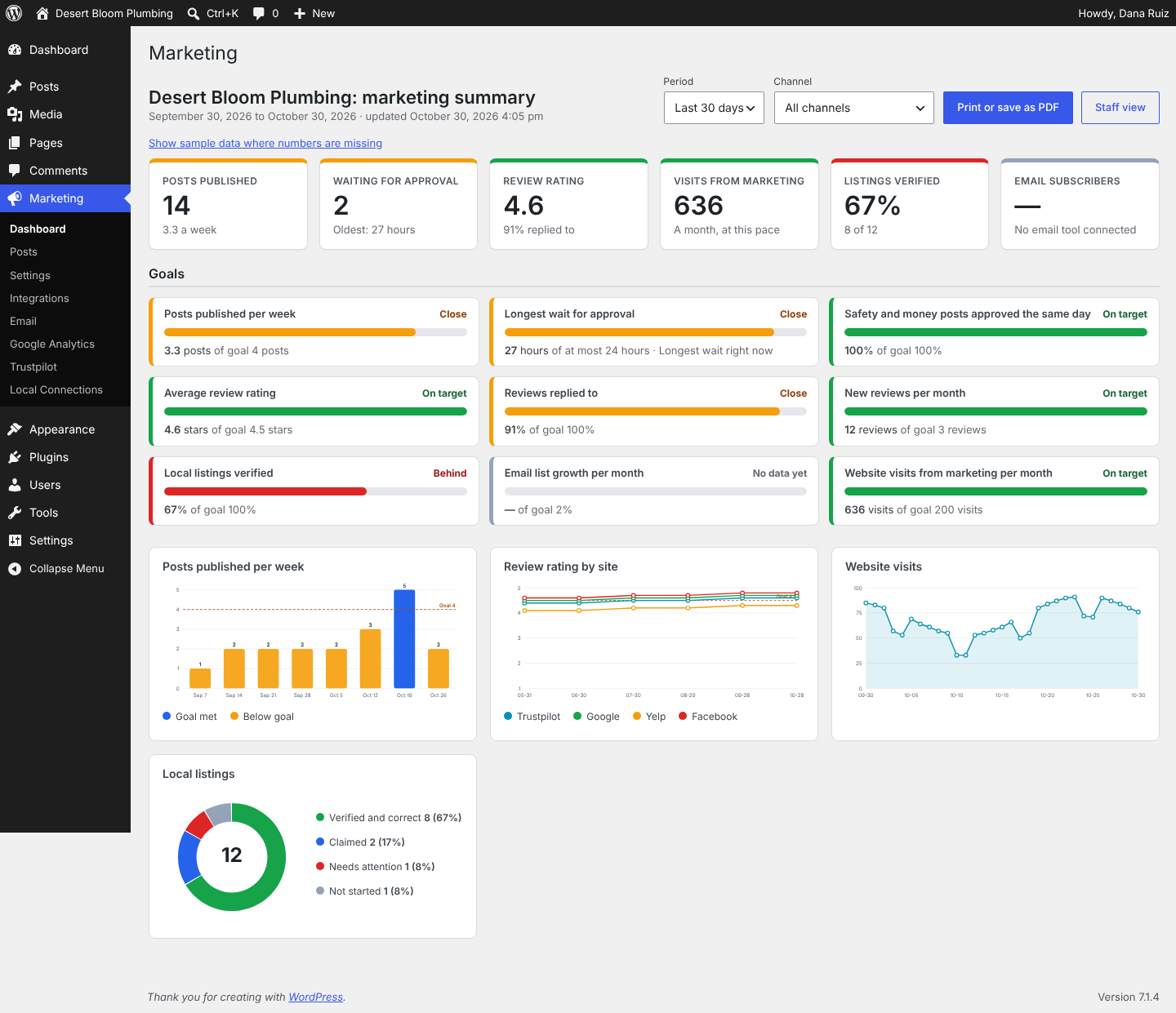
Dashboard and goals
Tiles and charts for posts published, approval wait times, review ratings, listings verified, email subscribers and website visits from marketing, each scored green, amber or red against goals you set.
Printable board summary
A one-page view for owners, managers and board meetings.
Google Analytics 4
Visits, people, traffic sources and top pages, plus visits from your tagged marketing links, through a read-only connection to your own account.
Keep reviews and listings in order
Reviews
A Trustpilot widget or "Review us" link in your footer or anywhere by shortcode, and a log of rating, review count and reply rate for Trustpilot, Google, Yelp and Facebook, charted over time.
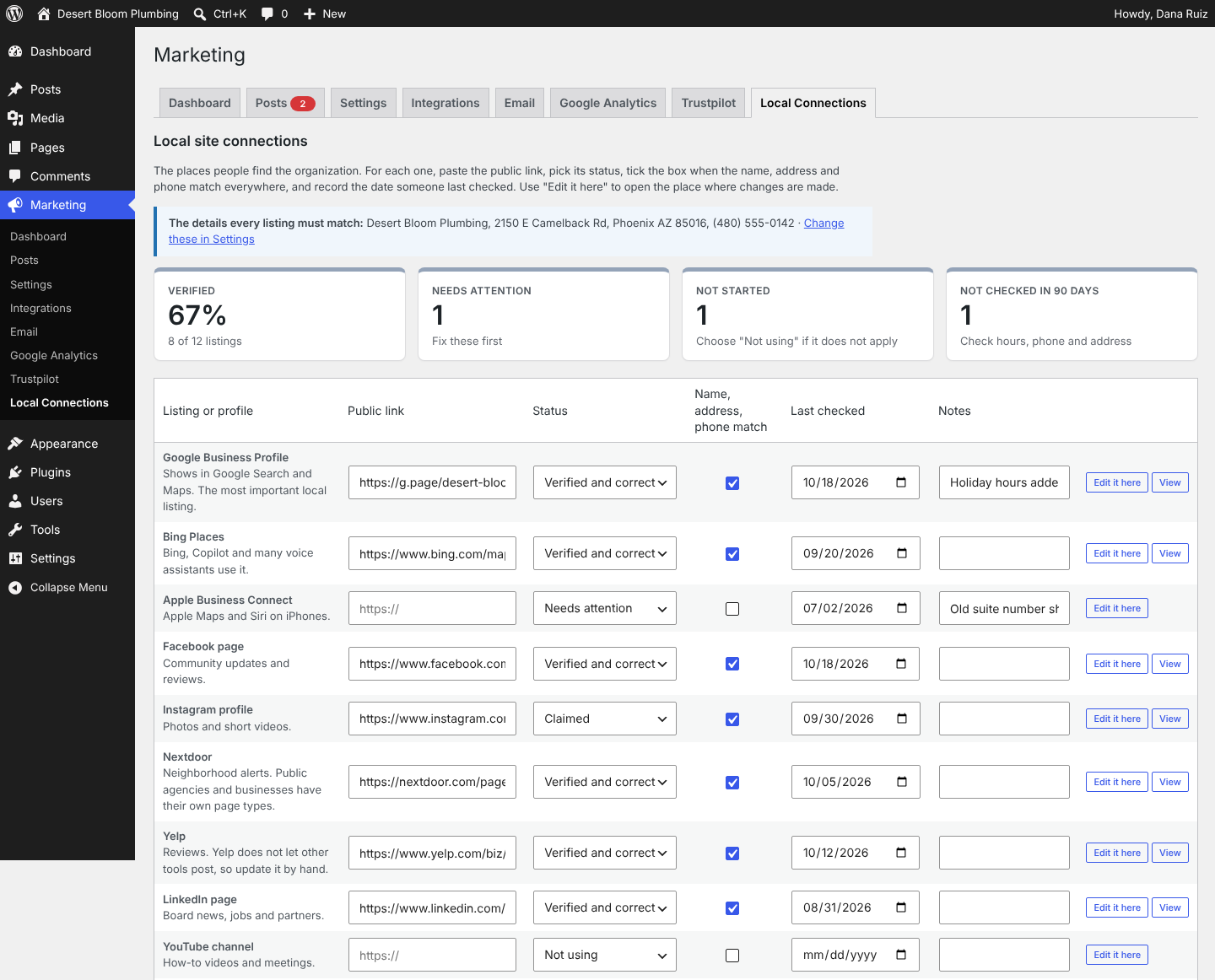
Local listings checklist
Track whether each listing is claimed and verified, whether name, address and phone match, and when it was last checked. Listings not checked in 90 days are flagged.
Local business data for search engines
Optional LocalBusiness structured data on your home page, including service areas and links to every verified profile.
Built for developers and agencies
Manage marketing for many local clients from the same plugin. Shortcodes [lmh_trustpilot] and [lmh_review_link], a theme hook, and filters let you tailor the hub for each client's site.
<?php echo do_shortcode( '[lmh_review_link]' ); ?>
Take a look inside
Sample data. Every screenshot shows Desert Bloom Plumbing, a fictional business.
Up and running in five steps
- 1Install and activate. In WordPress, go to Plugins → Add New → Upload Plugin, choose the zip file, click Install Now, then Activate.
- 2Add your details and goals. Open Marketing → Settings and enter your organization name, phone, address and service areas. Adjust your goals at the bottom of the page.
- 3Connect your accounts (optional). Publer under Marketing → Integrations, Google Analytics under Marketing → Google Analytics, and Trustpilot under Marketing → Trustpilot.
- 4List your profiles. Fill in Marketing → Local Connections with the listings and profiles you use.
- 5Write your first post. Go to Marketing → Posts → New Marketing Post.
Connects to the accounts you already have
Optional connections
Set up with your own accounts, only if you want them.
Listings and profiles it tracks
Checked for claim status, matching name, address and phone, and last-checked date.
Your site, your accounts, your data
Off until you turn it on
Outside services connect only when you switch them on.
Keys encrypted before they're saved
API keys are encrypted with your site's own secret keys, so a copy of the database alone doesn't reveal them.
Read-only Google access
The Google Analytics connection can read your numbers. It can't change anything in your account.
Free, or Pro when you need more
Common questions
Do I need a Publer account?
Only to send approved posts to social accounts automatically. Without it, the hub still handles writing, approval and tagged links, with a ready-to-post panel to copy from.
Which networks can it post to automatically?
Facebook, LinkedIn, X and Google Business Profile text posts. Instagram, YouTube and TikTok need pictures or video and are posted by hand for now. Nextdoor and Yelp don't allow posting from other tools.
Who can approve posts?
Anyone who can edit pages can approve ordinary posts. Safety and money posts need an administrator who didn't write them.
Are my API keys safe?
They're encrypted before they're saved, using your site's own secret keys, so a copy of the database alone doesn't reveal them.
Does the Trustpilot widget affect privacy?
It loads a script from Trustpilot, so mention it in your privacy policy. Developers can hold it back until a visitor gives consent.
Does it work with my SEO plugin?
Yes. The structured data is off by default. Leave it off if your SEO plugin already outputs Organization or LocalBusiness data.
What happens to my data if I delete the plugin?
Settings are removed. Marketing posts are kept unless the site owner chooses to remove all data.
Is it related to the Connect360 platform?
It's a separate, free product from the same team. It brings the Connect360 way of working (goals, approvals, and every number scored against a target) to local businesses running WordPress.
Version history
- Saved API keys are now encrypted. Keys saved by 1.0.0 are encrypted automatically after updating.
- A warning shows if a saved key can no longer be read.
- Optional fixed encryption key.
- Code specific to the first site was removed.
- Uninstall now cleans up fully.
- First release.
Get Local Marketing Hub
Free under GPLv2 or later. Install it on as many sites as you like.
- Version
- 1.0.1
- Requires
- WordPress 6.4+, PHP 7.4+
- Tested up to
- WordPress 7.1
- File size
- — KB
Selling online as well? See how Connect360 closes the loop for ecommerce brands.